JavaScript Framework SEO Best Practices 2025: SSR, Code Splitting, Mobile Optimization
The JavaScript SEO Challenge
Σύμφωνα με τη PageOneFormula, CurvesAndColors, και Neil Patel[1]:
JavaScript apps έχουν μεγάλο SEO πρόβλημα: Search engines δεν μπορούν να indexed client-rendered content καλά[2].
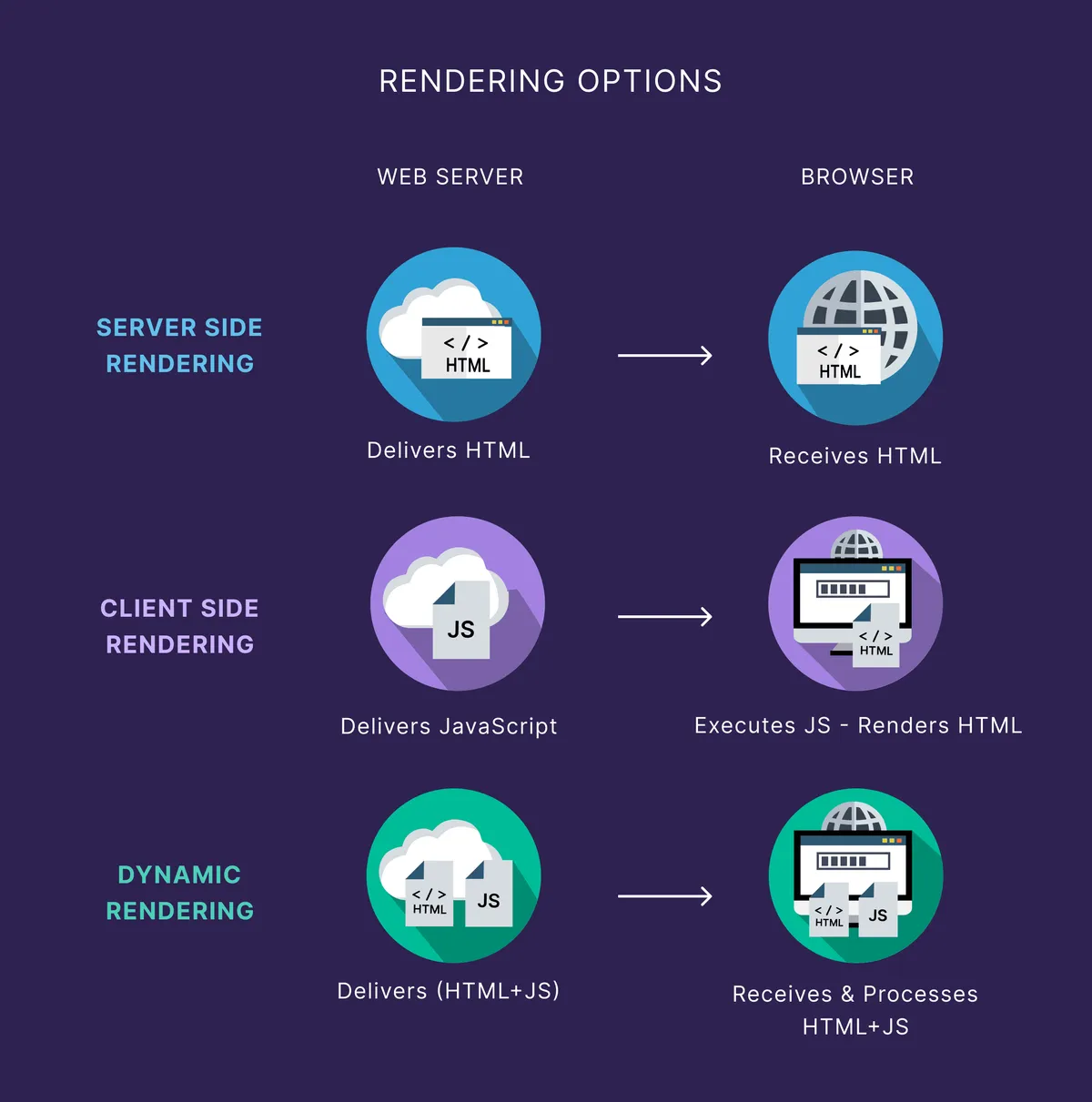
3 Core Rendering Strategies
1. Server-Side Rendering (SSR) - Best For SEO
How it works:
Request → Server Renders → Full HTML → Browser
+ Data Sent to browserAdvantages[3]:
- ✅ Full HTML in initial response
- ✅ Perfect crawlability
- ✅ Open Graph tags work
- ✅ Faster perceived load
Disadvantages:
- ❌ Server load is higher
- ❌ Complex to implement
When to use: Blogs, marketing sites, public content[4].
2. Dynamic Rendering - For Complex Apps
How it works:
Crawler?  → Serve Pre-rendered HTML
User? → Serve Full JS AppImplementation:
const isCrawler = req.headers['user-agent'].includes(
  'Googlebot|Bingbot|DuckDuckBot'
)

if (isCrawler) {
  res.send(await prerender(page))
} else {
  res.send(htmlWithJSApp)
}Tools: Prerender.io, Puppeteer, Rendertron[5].
When to use: SPAs with complex state, real-time features[6].
3. Static Site Generation (SSG) - Fastest
How it works:
Build Time → Generate All HTML → Deploy Static Files
           (once)
When to use: Blogs, content sites, documentation[7].
9 Technical SEO Best Practices For JS Apps
1. Code Splitting - Essential
Problem: Shipping 200KB JavaScript blocks rendering[8].
Solution:
// Webpack/Vite
const Dashboard = lazy(() => import('./Dashboard'))

// Only loads when needed
<Suspense fallback={<Loading />}>
  <Dashboard />
</Suspense>Impact: 40-60% smaller initial bundle[9].
2. Mobile-First Optimization
Stats: 53% of users abandon site if > 3 seconds[10].
Mobile Checklist:
- ✅ Touch targets ≥ 48x48 pixels
- ✅ Viewport meta tag
- ✅ No render-blocking resources
- ✅ Responsive images
- ✅ Async/defer scripts
3. Lazy Loading - Smart
Right: Images below the fold
<img loading="lazy" src="..." />Wrong: Content above the fold
// DON'T do this - crawlers miss it
<div style="overflow: hidden; height: 0;">
  <img loading="lazy" src="..." />
</div>
Best Practice: Lazy load non-critical content only[11].
4. Minimize Render-Blocking Resources
Problem:
Browser starts parsing HTML
↓
Hits <script> tag
↓
Stops parsing, downloads, executes
↓
Continues parsing (500ms+ delay)Solution:
<!-- Critical -->
<script>criticalCode()</script>

<!-- Defer non-critical -->
<script defer src="analytics.js"></script>

<!-- Or async -->
<script async src="third-party.js"></script>Impact: 30-50% faster First Contentful Paint[12].
5. Structured Data - Non-Negotiable
Implement JSON-LD:
{
  "@context": "https://schema.org",
  "@type": "Article",
  "headline": "Article Title",
  "author": "Author Name",
  "datePublished": "2025-01-15",
  "image": "https://example.com/image.jpg"
}Why: AI models use this to understand content[13].
6. Meta Tags Management
Easy in Next.js:
import Head from 'next/head'

export default function Page() {
  return (
    <Head>
      <title>Your Title</title>
      <meta name="description" content="..." />
      <meta property="og:image" content="..." />
    </Head>
  )
}
Easy in Nuxt.js:
export default {
  head() {
    return {
      title: 'Your Title',
      meta: [
        { name: 'description', content: '...' }
      ]
    }
  }
}
7. Sitemap & Robots.txt Generation
Next.js:
// pages/sitemap.xml.js
export async function getServerSideProps({ res }) {
  const posts = await getPosts()
  const xml = generateSitemap(posts)
  res.setHeader('Content-Type', 'text/xml')
  res.write(xml)
  res.end()
  return { props: {} }
}Astro:
// astro.config.mjs
import sitemap from '@astrojs/sitemap'

export default defineConfig({
  integrations: [sitemap()]
})
8. Handle Duplicates with Canonicals
Problem: /page and /page/ are treated as different URLs[14].
Solution:
<link rel="canonical" href="https://yoursite.com/page/" />Implementation:
// In Head
<link rel="canonical" href={`${siteUrl}${pathname}`} />
9. Progressive Enhancement
Build for no JavaScript first:
<!-- Works without JS -->
<form method="POST" action="/search">
  <input name="q" type="text" />
  <button>Search</button>
</form>

<!-- Then enhance with JS for better UX -->
<script>
  form.addEventListener('submit', async (e) => {
    e.preventDefault()
    // Fetch without page reload
  })
</script>
Core Web Vitals Optimization For JS Apps
LCP (Largest Contentful Paint) - Goal: ≤ 2.5s
Tactics[15]:
// 1. Compress images
img.webp (50% smaller than JPEG)

// 2. Use system fonts (no loading delay)
font-family: -apple-system, BlinkMacSystemFont

// 3. Inline critical CSS
<style>{criticalCSS}</style>

// 4. Prefetch internal links
<link rel="prefetch" href="/next-page" />
INP (Interaction to Next Paint) - Goal: ≤ 200ms
Tactics:
// 1. Break long tasks
await new Promise(resolve =>
  setTimeout(resolve, 0) // Yield to browser
)

// 2. Reduce main thread blocking
// Avoid heavy computations during user interaction

// 3. Use Web Workers for heavy tasks
const worker = new Worker('heavy-calc.js')
worker.postMessage(data)
CLS (Cumulative Layout Shift) - Goal: ≤ 0.1
Tactics:
// 1. Set image/video dimensions
<img width={400} height={300} src="..." />

// 2. Reserve space for ads
<div style={{width: '300px', height: '250px'}}>
  {/* Ad loads here */}
</div>

// 3. Avoid insertions above content
// Don't add banners after page loads
Testing & Monitoring
Tools[16]:
- Lighthouse: Built into Chrome DevTools
- WebPageTest: Real browser testing
- GTmetrix: Waterfall analysis
- Google Search Console: Real-world CWV data
- Semaph: Lab + field metrics
Monitor These:
// Performance Observer API
new PerformanceObserver((list) => {
  for (const entry of list.getEntries()) {
    console.log('LCP:', entry.startTime)
  }
}).observe({ entryTypes: ['largest-contentful-paint'] })
Συμπέρασμα
JavaScript SEO success requires:
- Right rendering strategy (SSR/SSG/Dynamic)
- Performance optimization (Code splitting, lazy load)
- Proper metadata (Structured data, meta tags)
- Mobile-first thinking
- Continuous monitoring
Bottom line: JavaScript can be perfectly SEO-friendly if implemented correctly[17].
Παραπομπές
[1] PageOneFormula. (2025). “Optimizing JavaScript Frameworks for SEO”. https://pageoneformula.com [2] Neil Patel. (2025). “The Definitive Javascript SEO Guide”. https://neilpatel.com [3] Kontent.ai. (2025). “Manage SEO in JavaScript applications”. https://kontent.ai [4] Ibid. [5] Gracker.ai. (2025). “JavaScript Framework Rendering: Technical SEO Guide”. https://gracker.ai [6] Prerender.io. (2024). “7 Tips For Creating Mobile-Friendly JS Sites”. https://prerender.io [7] Gracker.ai. (2025). “JavaScript Framework Rendering”. [8] Dev.to. (2025). “Web Performance Optimization in 2025”. https://dev.to [9] Ibid. [10] Ibid. [11] Prerender.io. (2024). “7 Tips For Creating Mobile-Friendly JS Sites”. [12] Dev.to. (2025). “Web Performance Optimization”. [13] Strapi. (2025). “Frontend Performance Checklist 2025”. https://strapi.io [14] PageOneFormula. (2025). “Optimizing JavaScript Frameworks”. [15] Dev.to. (2025). “Web Performance Optimization”. [16] Strapi. (2025). “Frontend Performance Checklist”. [17] Gracker.ai. (2025). “JavaScript Framework Rendering”.